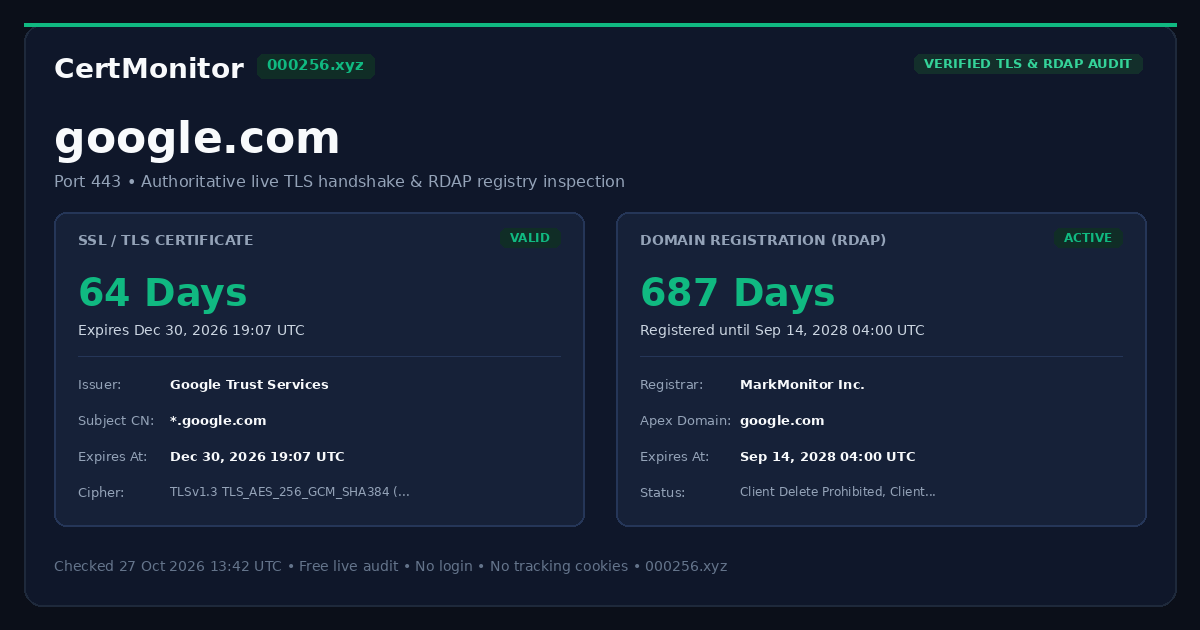
SSL / TLS Certificate
Direct TLS handshake
Runs a live TLS handshake and an RDAP registry lookup for any hostname and shows when the certificate and the domain registration expire. It also checks Certificate Transparency logs for a renewed certificate the server is not using yet. Free, no login, no cookies.
Many hosts? Check up to 25 at once: one table sorted by soonest expiry, with a CSV download.
curl -sL "https://000256.xyz/api/check?host=google.com&format=text"
Direct TLS handshake
Authoritative RDAP registry data
Why no expiry date?
Full trust path verification. We inspect the certificate hierarchy sent by the server and verify intermediate CA links to a trusted root in the Mozilla root store.
Complete certificate chain: Server certificate correctly links through intermediate CA to a trusted root in the Mozilla / system root store.
*.google.com
WE2
GTS Root R4
Certificate Transparency logs hold a certificate for google.com issued on by (crt.sh entry ). This server still presents the older certificate, which expires .
Usually the renewal itself worked and the web server, reverse proxy or load balancer has not been reloaded or given the new files yet. Reloading it, or redeploying the certificate, normally fixes this. It was issued less than 48 hours ago, so a rollout may still be under way.
The 24/7 monitor alerts on this once the served certificate is within 30 days of expiry and the renewed one has been in the CT logs for over 24 hours: one alert per renewed certificate, not repeated, on the free plan and the paid plan.
Every publicly trusted certificate is logged. We compare the newest ones with the certificate this endpoint actually serves.
| Issued | Expires | Issuer | Serial |
|---|
Data sources: the timestamps (SCTs) embedded in the served certificate, checked against the log keys in Chrome's CT log list, and crt.sh, the public Certificate Transparency search run by Sectigo, cached for up to 6 hours.
Each bar shows the time left: the certificate against its full lifetime, the domain registration against one year (a full bar means a year or more).
[](https://000256.xyz/audit/google.com)
<a href="https://000256.xyz/audit/google.com"><img src="https://000256.xyz/api/badge/google.com.svg" alt="TLS certificate expiry for google.com" height="20"></a>
The badge only shows the date. Alerts before expiry are the €4/month monitoring tier (10 hostnames; 3 can be monitored free).
Under the CA/Browser Forum baseline requirements, publicly trusted TLS certificates issued from March 15, 2026 are valid for at most 200 days. The limit drops to 100 days in March 2027 and 47 days in March 2029, so yearly manual renewal no longer works.
The check above runs once. Monitoring repeats it for you: each hostname every 24 hours, and every hour while something is wrong or within 14 days of expiry. Free for up to 3 hostnames with one alert destination, no account and no payment.
Alerts start 30 days before the certificate or the domain registration expires, whichever is first: a warning at 30 and at 14 days, a critical alert at 7 and at 1 day, each sent once.
You also get an alert when the TLS handshake fails, the certificate chain is not trusted, or the certificate does not cover the hostname. To avoid alerts for a one-off network blip, the problem must show up on two checks in a row, an hour apart.
Each check also compares the certificate your server serves with the newest one for the hostname in the Certificate Transparency logs (crt.sh). If a renewed certificate with a later expiry has been logged for more than 24 hours and the server still serves the old one, you get one alert with both expiry dates, once per renewed certificate. This runs once the served certificate is within 30 days of expiry. When crt.sh's answer is missing certificates (the served one's own CT timestamps prove it was logged), the check says so instead of reporting no renewal.
Alerts are webhook POSTs, sent the moment a check finds a problem: ntfy push, Telegram, Discord, Slack, Microsoft Teams, Google Chat or any HTTPS webhook. That is a Discord or Slack channel webhook, a Teams channel's Workflows webhook (the alert arrives as an Adaptive Card), a Google Chat space webhook, or an ntfy topic for phone push with the free ntfy app and no sign-up anywhere. Telegram bots and your own HTTPS endpoint (JSON) work too, all on every plan. Every alert includes days left, expiry dates and the issuer. No SMS.
We send a test alert first and start monitoring only if it arrives. You then get a private manage link where you can add or remove hostnames, run a check now, or stop monitoring, which deletes everything we stored for it.
UptimeRobot is the standard website monitor, and its free plan is generous: 50 monitors checked every 5 minutes, covering HTTP(S), port, ping and keyword checks, with alerts to many channels and a mobile app. If you need to know when your site goes down, use it. We do one narrower job: tell you when a TLS certificate or a domain registration is about to run out, right now and without an account.
| Feature | CertMonitor (this site) | UptimeRobot |
|---|---|---|
| One-off check, no account | Yes. Type a hostname above and get the certificate and the domain expiry in seconds. | Monitoring needs an account. Its free tools include a DNS lookup and calculators, but no instant certificate or domain expiry check. |
| Uptime monitoring (HTTP, port, ping, keyword) | No. We don't check whether your site is up. | Yes, free: 50 monitors at a 5-minute interval. Paid plans go down to 60, 30 and 15 seconds. |
| Certificate expiry alerts | Free for 3 hostnames, checked daily and hourly when something is wrong. We also alert on an untrusted chain, a hostname mismatch or a failed handshake. Paid: €4/month for 10 hostnames. | On paid plans, from Solo at €108/year for 10 monitors: alerts 30, 14 and 7 days before expiry, and when the certificate has a problem. The Free plan card lists “SSL & Domain exp. monitor” with a red ✕ (not included), and the feature table says “SSL monitoring is included only in paid plans.” |
| Renewed certificate never deployed | Yes, free. We compare the served certificate with the newest one in the CT logs and alert once per renewed certificate that is still not deployed 24 hours after it was logged, with both expiry dates. | Its SSL monitoring page describes expiry and error alerts for the certificate the endpoint serves and does not mention Certificate Transparency logs, so a renewal that was issued but never installed shows up only as the old certificate nearing expiry. |
| Domain registration expiry | Yes, free, from the registry's public RDAP record. If a registry hides the date, we say so instead of guessing. | On paid plans: alerts 30, 14 and 7 days before the domain expires. Its domain monitoring page says “It’s automatically enabled on paid plans.” Same red ✕ on the Free card. |
| Certificate details | Issuer, SANs, serial, protocol and cipher, plus the newest Certificate Transparency log entries next to the certificate actually served. | Expiry and certificate-error alerts on paid plans. Its pricing page lists no tool that shows a certificate’s issuer or SANs. |
| Alert channels | Instant webhook alerts to Discord, Slack, Microsoft Teams, Google Chat, ntfy push, Telegram or any HTTPS endpoint, on every plan including free. No email alerts and no SMS. | Free: email, Google Chat, Discord, Pushover, Pushbullet, Splunk and more. Slack, Mattermost, Telegram and Teams from Solo; webhooks, Zapier and PagerDuty from Team. SMS and voice credits are sold separately. |
| Status pages, teams, API, multi-region checks | None. No team accounts, no public status pages, no API, single-region checks. | Yes. One basic status page is free; more, plus seats and multi-region checks, on paid plans. |
| Account, cookies, tracking | No account. This page sets no cookies and loads no analytics or third-party scripts. | You create an account to make monitors. |
Short version: for uptime, use UptimeRobot. For a quick certificate or domain answer, or expiry-only alerts without an account, use this. The two work fine together. UptimeRobot details come from uptimerobot.com/pricing (Free plan card, feature table and FAQ), /domain-expiration-monitoring and /free-tools as of 24 October 2026. Plans change, so check there before you decide. We are not affiliated with UptimeRobot.